Tutorial 2
Does headline-length affect Click-Through Rate (CTR)?
Introduction
Before making changes to optimize websites or content to increase engagement, it's important to really understand what is driving user behaviour. This tutorial is derived from an article by Adam Kelleher. Adam critically examined the data behind another blog article which claimed that a headline-length of 16-18 words maximized engagement, and noticed that what was actually happening was that a few popular authors tended to pick longer headlines, yet long headlines didn't necessarily help other authors.
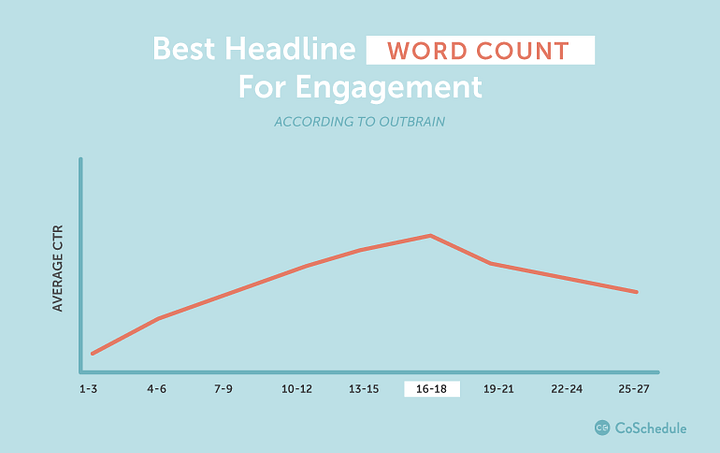
Using Causal Inference we can repeat the experiment and examine the effect of headline-length on Click-Through Rate when controlling for Author.
We will do this in two stages.
First, we'll model the effect of headline-length on click through rate without considering authorship, and see what happens. We expect to see that longer headlines lead to higher click-through rates.
But wait!
What Adam showed was that when accounting for authorship, the effect disappeared. In this data, longer headlines don't in fact cause higher click through rates. Better authors cause higher click through rates!
So, we'll modify the Study to reflect that and see what happens to the results. We expect to see the (false) effect of headline-length disappear.
Step 1: Get the data
Download tutorial-2-headlines.csv, then upload it via the Data page.
Step 2: Create a new Study
- Click on Studies in the menu bar.
- Give the new Study any name you like (e.g. Tutorial 2).
- Select the Dataset you just uploaded, and press Create.
Step 3: Specify Treatment and Outcome
We want to see whether longer titles increase click-through rate. So, select variable title_length as the Treatment and select click_through_rate as the Outcome.
Adam's model says that a "long" title is one with more than 10 words.
- Click Treatment groups to open the group editor.
- Set the Treated row's lower bound to > 10, and the Control row's upper bound to ≤ 10.
Step 4: Draw Causal Diagram
The next step is to tell Causal Wizard how these variables interact. Following the original case study, we'll first assume only that:
- title_length affects click_through_rate directly
(Adam's original case study didn't consider author, leading to the claim that longer headlines lead to more clicks - we'll add author back in shortly.)
- Add nodes for title_length and click_through_rate (click empty space in Edit nodes mode, choose the variable, Save).
- Switch to Draw edges and drag from title_length to click_through_rate.
Step 5: Check, download, and run the notebook
- Press Check.
- If everything went as planned, select "Backdoor: Linear regression" as the Model.
- Click Download config JSON.
- Open the notebooks (Open in Colab, or clone the repository), and run both notebooks top to bottom, providing your config file and data file when asked.
Step 6: Reviewing the results
In the Findings section, the key finding is that title length greater than 10 has an effect of around +0.01 on click through rate. While that might not seem like much, the average click through rate is 0.05, so +0.01 is a 20% increase!
The problem is that as Adam pointed out, the effect of authorship is being ignored. Let's go back to the Study and add the missing edges.
Step 7: Modifying the Causal Diagram
- Go back to your Study (Studies in the menu bar, open "Tutorial 2" again).
- Add a node for author.
- Switch to Draw edges and add two edges: from author to title_length, and from author to click_through_rate.
There should now be 3 edges in total.
- Press Check again.
- Confirm "Backdoor: Linear regression" is still selected, and download the new config file.
- Run it through the notebooks again, the same way as before (you can reuse the same data file).
Step 8: Review the updated results
In the new Findings section, you should now notice that the causal effect has disappeared - the new estimate, controlling for authorship, is close to 0. Notice also that the significance tests in the Refutation / validation section now suggest the result is no better than chance.
The key takeaway here is that properly accounting for a confounding variable (authorship) eliminated what originally appeared to be a promising insight. If we had just done a simple association or non-causal analysis of the title length and click through rate, we might right now be "optimizing" our web content in completely the wrong way...